Rear Panel
The rear panel is displayed in the following figure and described in the subsequent table.
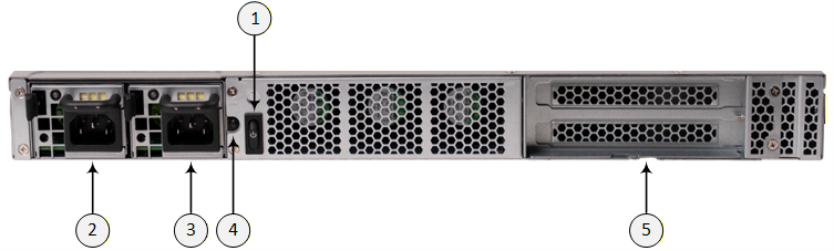
Rear Panel
|
Item # |
Description |
||||||||||||
|---|---|---|---|---|---|---|---|---|---|---|---|---|---|
|
1 |
Power switch. |
||||||||||||
|
2 |
Power Supply module 1 (PSU1). |
||||||||||||
|
3 |
Power Supply module 2 (PSU2). |
||||||||||||
|
4 |
Power Supply (PSU) Beep Off button. Press the button to turn off the Power alarm. The Power alarm is heard (long beep) whenever a power failure is detected on one of the Power Supply module. A failure could be any of the following:
|
||||||||||||
|
5 |
Two PCIe Expansion slots. Note: Currently, not in use. |